
Laptop Stand Buying Guide: How to Choose the Right One
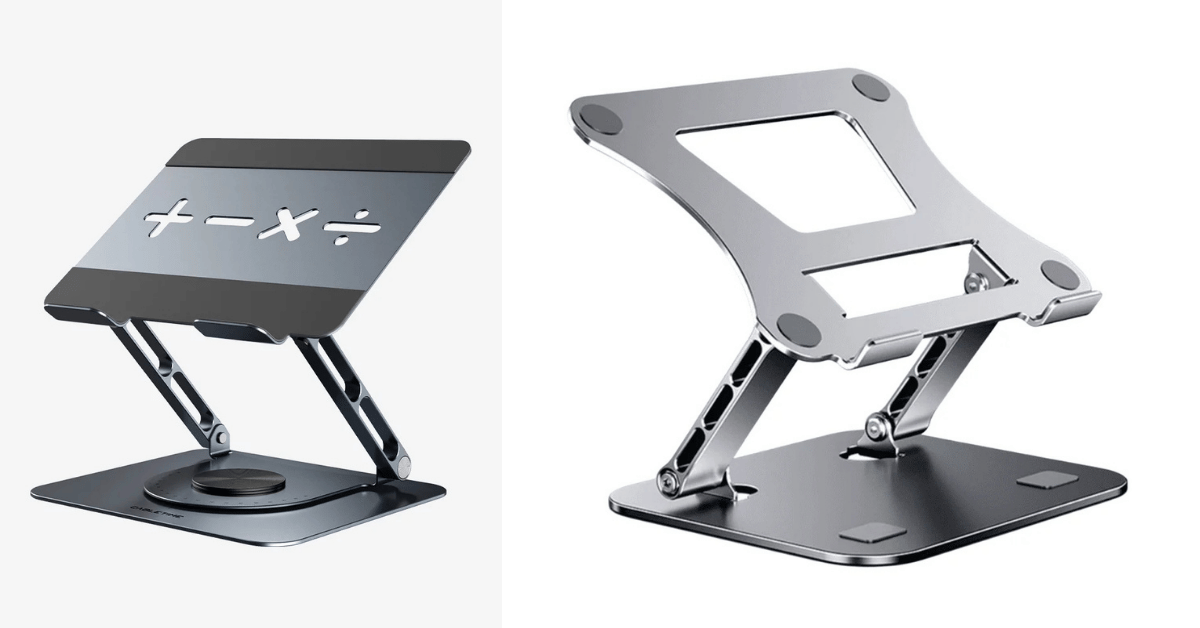
Anyone who’s put in a full day on their laptop knows the drill sore neck, tight shoulders, screen that always feels too low. That’s basically what a laptop stand fixes. Small accessory, doesn’t look like much, but it can genuinely change how your whole desk setup feels.
Picking the right laptop stand though? That’s where it gets confusing. Some stands are built to sit permanently on a home office desk, others fold up for travel. Some are all about adjustability, others just keep things light and cheap. Really it comes down to your laptop, your desk, and how you actually work day to day.
What Does a Laptop Stand Actually Do?
Pretty simple, really a laptop stand lifts your laptop off the desk. Instead of the screen sitting at desk height, it goes up, and usually you get some tilt control too.
That alone makes a difference, especially if you’re using an external keyboard and mouse alongside it. Bonus is you also free up desk space and let a bit more air move underneath the machine.
You’ll mostly see three types of laptop stand out there: fixed stands (one height, done), adjustable ones (change it whenever), and portable stands (fold flat, travel-friendly).
Adjustable Laptop Stands
If you like having control over your setup, an adjustable laptop stand is the way to go. Change the height, change the angle whatever works for your chair or desk that day.
This matters a lot if you work from different spots, or if you switch between sitting and standing during the day. Instead of being locked into one position, you just tweak it.
Only catch don’t sacrifice stability for adjustability. Some cheaper models wobble the second you start typing, which gets old fast. Look for a solid base and hinges that actually hold their position instead of drifting around.
Fixed Laptop Stands for a Permanent Desk
Got one desk, same laptop every day? A fixed laptop stand is probably all you need.
They’re simple fewer moving parts, nothing to adjust once it’s set up. That simplicity also tends to make them look cleaner on a permanent workstation.
Just double-check the height before buying, because unlike adjustable models, there’s no fixing it later if it’s wrong.
Getting the Size Right
Don’t skip this step. A laptop stand made for a 13-inch laptop won’t necessarily hold a 16 or 17-inch one properly.
Check the manufacturer’s weight limit and platform dimensions before buying that part’s non-negotiable. And look for rubber or silicone padding too, since it stops the laptop from sliding and protects the underside from scratches.
Basically, fit matters way more than how good the stand looks in photos.
Aluminum, Steel, or Plastic?
Aluminum’s the popular pick for a laptop stand for good reason strong enough, doesn’t add much weight, and looks clean on most desks.
Steel’s more stable but heavier, so it makes more sense for a desk that never moves rather than something you’re carrying around. Plastic stands are lighter and cheaper, but quality varies a lot some feel solid, some don’t, so it’s worth checking before you commit.
Whatever the material, stability is what actually counts. A nice-looking stand that wobbles isn’t doing its job.
Does a Laptop Stand Help With Cooling?
To some extent, yeah. Laptops usually vent from underneath, and that airflow can get blocked when the machine sits flat on a desk. A laptop stand creates a gap, so air moves a little more freely.
Don’t expect it to replace proper cooling though if you’re doing anything demanding like gaming or video editing, your laptop’s internal fans are still doing the heavy lifting. The stand’s just a nice extra.
Portable Laptop Stands for Travel
For students, freelancers, or anyone bouncing between locations, portability matters just as much as stability.
A good portable laptop stand folds down small enough to fit in a backpack without adding much weight. When shopping for one, check the folded size, the weight, and how much laptop weight it can actually hold.
Pairing With a Keyboard and Mouse
Once your laptop’s up on a stand, typing on the built-in keyboard gets awkward it’s just too high up. That’s why most people add an external keyboard and mouse into the mix.
This setup works well because you get to position the screen and typing area separately, instead of settling for one spot that kind of works for both.
What to Actually Look For
Start with your laptop’s size and weight. Then think about where you use it most.
Sticking to one desk? Prioritize stability and build quality. Traveling a lot? Go lightweight and foldable. Switching positions throughout the day? An adjustable laptop stand is probably worth the extra cost.
Desk space matters too a big stand might be super stable but awkward on a small desk already crowded with a monitor, keyboard, and other stuff.
Is a Laptop Stand Worth Buying?
If you only use your laptop occasionally, probably not essential. But if you’re at it for hours every day, a laptop stand is a small purchase that can genuinely improve your setup better posture, more desk space, maybe a bit of extra airflow too.
There’s no single “best” laptop stand for everyone. It really comes down to your laptop, your desk, your habits, and whether portability matters to you.
Quick FAQ
What type of laptop stand is best?
Adjustable stands are generally the most versatile, while fixed stands work well for a permanent setup.
Can a laptop stand improve airflow?
It creates space underneath the laptop that can help airflow, especially with an open design though it’s not a substitute for proper cooling.